- Project
- Fundraise Up
- My role / type
- Founding Designer
- Dates
- Sep 2017–Dec 2018
- Focus
- Donation experience · Product foundations · Early-stage craft
0Surface

Replacing the long donation form with a compact checkout that asks one question at a time.
Current live product−1Why?
Every extra field is another reason to hesitate, and on a phone the form turns into an endless scroll.
−2Why?
Donors had to face every field before making their first real decision — how much to give.
−3Core
One decision at a time.
“It starts with the only question that matters first — how much, and how often — and asks for payment details only after that choice is made.”
My partAs the founding designer, I turned that idea into a working donation experience. I used gamification and motion to guide each step.
=Proof
Key outcomes
- Widget conversion
- 2.8×
- Through a gamified donation experience.
- Donor satisfaction
- ~98%
- CSAT for the donation experience.
- Growth capital
- $70M
- Company funding milestone announced in 2025.
- For context, not credit
- Team growth
- 12 → 350+
- From an early public team snapshot to the current company-reported headcount.
- For context, not credit
In brief
Giving online used to mean filling in a long form. As founding designer, I helped Fundraise Up replace it with a checkout built around one decision at a time.
The established pattern
The industry standard: a donation that feels like paperwork.
When Fundraise Up started, the accepted way to donate online was one long page: donation details, personal information, billing address, payment and extra options, all at once. Donors had to face every field before making their first real decision — how much to give.
Every extra field is another reason to hesitate, and on a phone the form turns into an endless scroll.
Fundraise Up set out to do the opposite.
Illustration of the traditional long-form pattern.
01. Donation details
02. Your information
03. Billing address
04. Payment information
05. Additional details
The idea
One decision at a time
Instead of sending donors to a separate page full of fields, the checkout opens as a compact widget on the nonprofit’s own site. It starts with the only question that matters first — how much, and how often — and asks for payment details only after that choice is made.
As the founding designer, I turned that idea into a working donation experience. In a small team, the work moved between interface detail, product priorities and communication without a large structure around it.
The feel
Keep the donor moving
A short form still needs momentum. I used gamification and motion to guide each step: a clear choice between one-time and monthly giving, suggested amounts that adapt to that choice and small moments of positive feedback. This increased conversion into monthly payments and made recurring giving easy to understand from the start.
The donation button carried the experience from processing to a clear success state. Immediate animated feedback reduced the perceived wait and removed the feeling of a long loading screen while the payment was being processed.
The result
Less paperwork, more giving
The overall donation conversion increased 2.8×, with donor satisfaction at around 98% CSAT.
Clarity became the competitive advantage. The compact checkout helped a small company compete with much larger, established platforms whose donation journeys still relied on long forms.
Customer reviews
What nonprofits said about the checkout
“The front-end experience is, simply put, sexy. It’s sleek and well-designed, as opposed to the clunky fundraising interfaces out there.”
“UI/UX - Elegant, intuitive, and efficient, there is not a better looking platform in the game today.”
“I also really like the UX for the admin and donors. It’s highly customizable, sleek and can match any branding.”
Customer reviews of Fundraise Up on Software Advice, written about the product.
The other side
Design for the nonprofit, too
A checkout is only half of the product. I also worked on the surfaces nonprofits use every day: the campaign overview brought donations, recurring gifts and supporters into one clear operating view.
Early-stage design
Explain it before it exists
Founding design included early pitch and marketing materials as well as the interface itself. That breadth taught me how design can help a company explain what it is building before its product and team are fully formed.
Live product
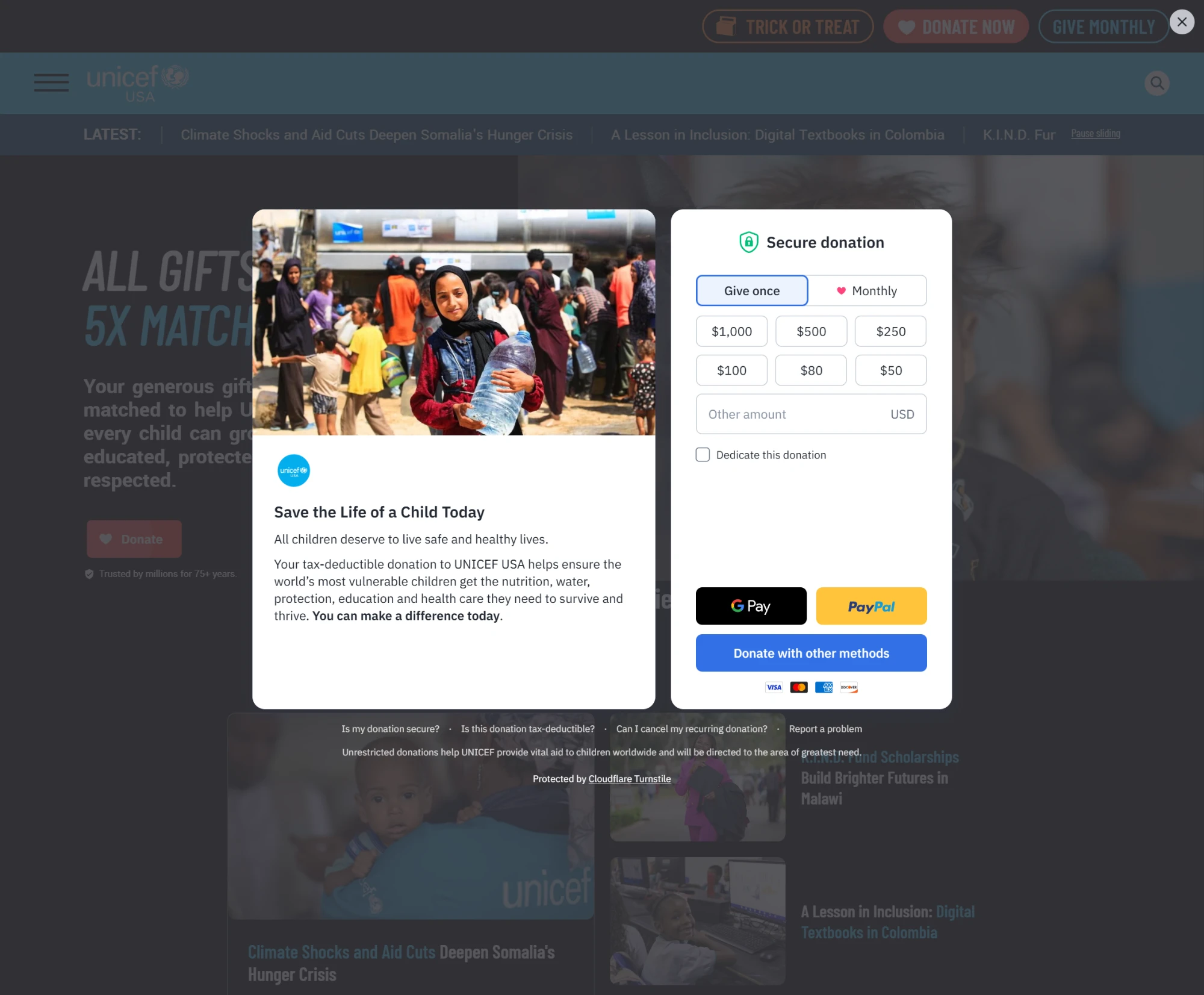
Press Donate on UNICEF USA.
The same idea still runs today: press Donate on a site like UNICEF USA, and the compact checkout opens right on the page.
Visit Fundraise Up