- Project
- Subskim
- Type
- Independent app
- My role
- Idea, design and build, with AI
- Focus
- Subscription clarity · AI-assisted import
0Surface


Subscriptions are easy to start and easy to forget. Subskim makes every recurring charge visible before it renews.
Current live product−1Why?
Subscriptions are built to be easy to start and easy to forget.
−2Why?
Tracking them by hand means typing every subscription in — exactly the chore that stops people from doing it at all.
−3Core
AI takes on the tedious part, and a person stays in control of the decisions.
“I designed and built Subskim myself, with AI, to make every recurring charge visible — and the decision to keep it a deliberate one.”
My partI came up with Subskim, designed it and built it myself with AI — from the first product decisions to the working app.
=Proof
Product highlights
- Adding subscriptions
- AI import
- Extract subscription details from screenshots, then review before saving.
- Upcoming payments
- Renewal calendar
- See what renews next alongside recurring spending.
- Ongoing decisions
- Monthly review
- Revisit subscriptions and decide what still earns its place.
In brief
Subscriptions are built to be easy to start and easy to forget. I designed and built Subskim myself, with AI, to make every recurring charge visible — and the decision to keep it a deliberate one.
The problem
Easy to start, easy to forget
Recurring charges hide in different places: cards, app stores, invoices and emails. A free trial quietly becomes a payment, and a renewal arrives as a surprise.
Tracking them by hand means typing every subscription in — exactly the chore that stops people from doing it at all.
The idea
See it all, calmly
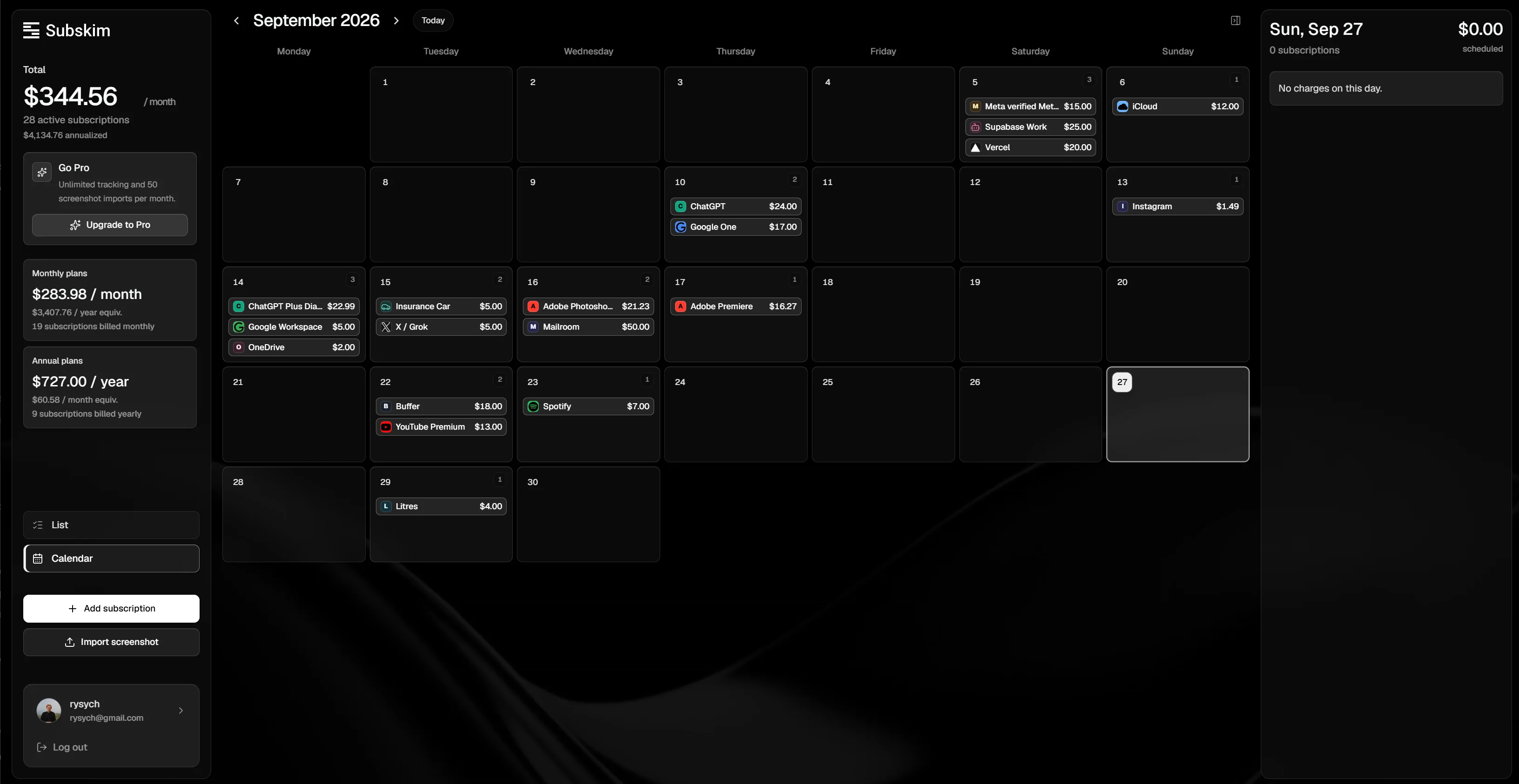
The product groups subscriptions by status, billing cycle, category and spending. A calendar surfaces what renews next, while a periodic review helps people decide what still earns its place.
Its visual language is calm and direct because the task is about recognizing patterns and making choices, not adding another layer of noise.
The shortcut
Import, then review
AI-assisted screenshot import can suggest subscription details from an image. The extracted information is shown to the user for review before it is saved.
That confirmation step matters: a screenshot can be incomplete or misread, and the person remains responsible for what enters their subscription list.
The habit
Support an ongoing habit
Subskim combines a command center, renewal calendar and monthly review so that subscription management continues after the initial setup.
The experience links the first import to a recurring review: notice a charge, confirm its details and decide what to do before the next renewal.
The build
From idea to live product, solo
I came up with Subskim, designed it and built it myself with AI — from the first product decisions to the working app.
The same principle runs through the product and how it was made: AI takes on the tedious part, and a person stays in control of the decisions.
Live product
Try Subskim with your own subscriptions.
Subskim is live: add a few subscriptions, or import them from a screenshot, and see what renews next.
Try Subskim